Welcome to Nine Two Media Training & Resource Portal
Connecting Your Calendar & Zoom To CRM
The purpose of this video is to show you how to properly connect your primary calendar to your new CRM.
Syncing your primary calendar will ensure you are never double booked, as long as you keep your primary calendar up to date with your own appointments.
Conversations Tab
Conversations Tab Overview
In this video, you’ll learn how to use the Conversations tab inside your CRM.
This is your central hub for all communication with leads including inbound and outbound calls, texts, and emails.
You can listen to call recordings, view message history, and track every interaction in one place.
This is also where:
Inbound calls are received
Outbound calls are made on your behalf
Appointment reminders are automatically sent via text and email to stay connected on the go.
Download the “Lead Connector” app from your App Store.
Log in with your CRM credentials so you never miss an inbound call or message.
You can also reply directly through the CRM, keeping all communication organized without sharing your personal number.
Updating Appointment Status - Show/No Show
Appointment Status: Marking Showed & No Show
In this video, you’ll learn how to update the status of each appointment booked for you.
Before marking someone as a No Show, make sure you’ve followed our No Show Process outlined in the Closing Perfect Appointments framework which is also available below in this training portal.
Keeping your appointment statuses accurate is essential. If we don’t know about no-shows right away, we can’t help you reschedule and recover missed opportunities.
Marking each appointment as “Showed” or “No Show” keeps everyone accountable and helps us support you in closing more deals.
Clients who stay consistent with this process see the best results.
Navigating Sales Pipeline & Opportunities
Navigating Your Pipelines
In this video, you’ll learn how to view and manage both pipelines inside your CRM.
Our Appointment Setting Pipeline and your Sales Pipeline.
You’ll see how to navigate between the two and move contacts based on the outcome of your appointments, keeping your leads organized and your sales process on track.
Navigating All Your Contacts
Navigating Your Contacts
In this video, you’ll learn how to view and manage all contacts generated from your marketing efforts.
You’ll see how to use Smartlists to filter and organize contacts, making it easy to find specific leads, view tags and contact details, and communicate directly from the CRM.
Smartlists also help you segment your audience for future marketing campaigns and give you a clear view of your total lead count, appointments, and activity at a glance.
Appointment No Show Framework
Appointment No-Show Framework
In this video, you’ll learn a step-by-step process for handling appointment no-shows and turning missed calls into new opportunities.
This framework walks you through how to follow up effectively, re-engage leads, and get them back on your calendar without starting from scratch.
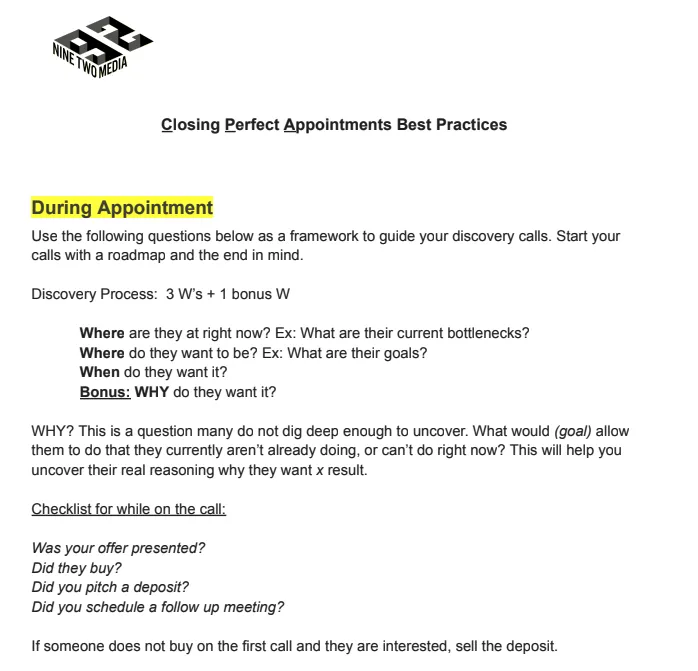
You’ll see proven strategies including the “3 W’s + 1 Why” follow-up method, double-dialing techniques, and deposit positioning to strengthen commitment and reduce future no-shows.
You’ll also gain access to voicemail, SMS, and email templates, plus a structured follow-up schedule to help you recover lost appointments and close more deals.
https://drive.google.com/file/d/1trG1KFcStXOFGaI2F0H-iNr_s3ysbZcD/view?usp=sharing
Closing Perfect Appointments - Best Practices